💡 Usage
With this plugin you have full control over which redirects should be active for your front-end. You can create, update and delete redirects right from the Strapi admin panel.
Overview
On the redirects overview you can see all the redirects on your site.

Create redirects
With the button in the top right you can create new redirects.
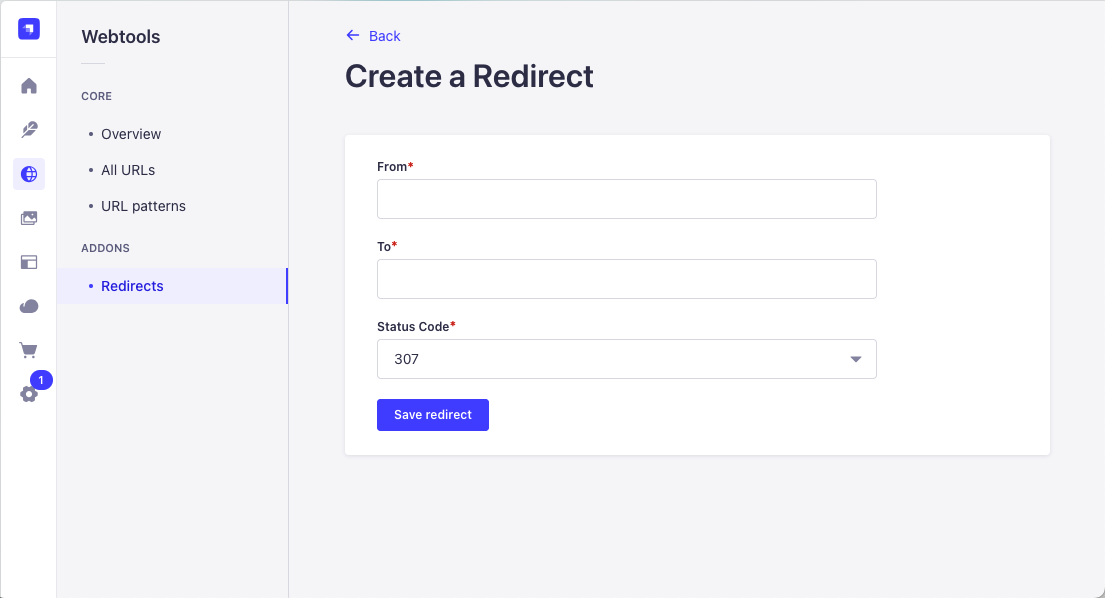
URL Format
When creating redirects, follow these guidelines for the URL paths:
From Path (Source URL):
- Always start with a forward slash
/ - Use relative paths only (no domain)
- Example:
/old-pageor/blog/old-article
To Path (Destination URL):
- For internal redirects: use relative paths starting with
/- Example:
/new-pageor/blog/new-article
- Example:
- For external redirects: use the full URL including protocol
- Example:
https://example.com/page
- Example:
Examples:
| From Path | To Path | Description |
|---|---|---|
/old-page | /new-page | Internal redirect |
/blog/article | /news/article | Internal redirect to different section |
/external | https://example.com | External redirect |
Status Codes
Choose the appropriate HTTP status code for your redirect:
| Status Code | Name | Description | Use Case |
|---|---|---|---|
| 301 | Permanent Redirect | The resource has been permanently moved to a new location. Search engines will transfer the SEO value to the new URL. | Use when a page has permanently moved and you want to preserve SEO rankings. |
| 302 | Temporary Redirect | The resource is temporarily at a different location. Search engines keep the original URL indexed. | Use for temporary changes, A/B testing, or maintenance pages. |
| 303 | See Other | The response to the request can be found at another URL using a GET request. | Use after POST/PUT requests to redirect to a confirmation page. |
| 307 | Temporary Redirect (Preserve Method) | Like 302, but guarantees the request method won't change. | Use when you need to preserve POST/PUT methods in the redirect. |
| 308 | Permanent Redirect (Preserve Method) | Like 301, but guarantees the request method won't change. | Use for permanent redirects where the request method must be preserved. |
- Most common: Use 301 for permanent redirects and 302 for temporary ones
- SEO impact: 301 redirects transfer ~90-99% of link equity to the new URL
- Caching: 301 redirects are cached by browsers, 302 redirects are not
Be careful with 301 redirects as they are heavily cached by browsers. If you need to change a 301 redirect, users may not see the change immediately due to browser caching.
Access
After you've followed the steps above you can now access your redirects through the REST API of Strapi. It will be available at:
http://localhost:1337/api/webtools/redirects.
You need to setup permissions for this endpoint to be accessible. See the REST API documentation for details.
Frontend Implementation
Now that you have access to the redirects API, you need to implement the redirects in your frontend. There are two approaches:
Option 1: Framework Redirects Configuration
Most modern frameworks have built-in redirect features (Next.js, Nuxt, etc.). You can fetch redirects from the Strapi API and configure them in your framework's configuration file.
Note: This approach is framework-specific and requires different setup for each framework. Consult your framework's documentation for redirect configuration.
Option 2: API Check Before Router (Recommended)
The recommended approach is to check for redirects before calling the Webtools router endpoint. This works consistently across all frameworks and tech stacks.
Flow:
- User navigates to a URL (e.g.,
/old-page) - Your frontend calls the redirects API:
GET /api/webtools/redirects - Check if the current path matches any redirect's
fromfield - If redirect exists: Navigate to the
toURL with the appropriate status code - If no redirect: Proceed to call the Webtools router endpoint:
GET /api/webtools/router?path=/old-page
Why this works:
- Framework-agnostic solution
- Works with the Webtools router endpoint pattern you're already using
- Ensures redirects are checked before attempting to fetch content
- No need for complex server middleware or build-time configuration
Performance tip: Cache the redirects list in memory for 1-5 minutes to avoid fetching on every request.
This approach integrates seamlessly with the Webtools router workflow. See the REST API Router documentation for details on how to fetch content by path.
No Cron Needed: Unlike the sitemap addon which uses cron jobs to generate files, redirects are immediately available via the API after creation in the admin panel.
Redirect Chains and Loops
The Webtools Redirects addon includes built-in protection against redirect chains and loops, which can harm user experience and SEO.
What is a Redirect Chain?
A redirect chain occurs when multiple redirects are needed to reach the final destination. This creates an inefficient path that slows down page loads.
Example of a chain:
/page-a → /page-b → /page-c (final destination)
When a user visits /page-a, they are first redirected to /page-b, then redirected again to /page-c. This requires two HTTP requests instead of one.
Why chains are problematic:
- Slower page loads: Each redirect adds network latency
- SEO penalties: Search engines may not follow long chains and could lose link equity
- User experience: Visitors experience longer wait times
- Server load: More requests mean more server resources
Best practice: Always redirect directly to the final destination:
/page-a  →  /page-c
/page-b  →  /page-c
What is a Redirect Loop?
A redirect loop occurs when redirects create a circular reference with no final destination.
Example of a loop:
/page-a → /page-b → /page-a (back to start)
This creates an infinite loop where the browser keeps redirecting between pages until it gives up and shows an error.
Why loops are critical:
- Broken website: The page becomes completely inaccessible
- Browser errors: Users see "Too many redirects" or "Redirect loop detected"
- SEO disaster: Search engines cannot index the page
Chain and Loop Detection
The addon automatically validates redirects and prevents you from creating chains or loops. If you try to create a redirect that would result in a chain or loop, you'll see an error:
Creating this redirect would create a chain, please change it.
Common scenarios that trigger this error:
-
Existing redirect path: You try to create a redirect where the "To" path is already the "From" path of another redirect
Existing: /old-page → /new-pageAttempt: /campaign → /old-page ❌ (would create chain) -
Reverse redirect: You try to create a redirect that reverses an existing one
Existing: /page-a → /page-bAttempt: /page-b → /page-a ❌ (would create loop) -
URL alias conflict: You change a URL alias to a path that's involved in an existing redirect
Existing redirect: /google → /google5Changing URL alias from /google5 to /google ❌ (would create conflict)
How to Fix Chain/Loop Errors
If you encounter this error:
- Check existing redirects: Review your redirect list for conflicts
- Update existing redirects: Instead of creating a new redirect, update the existing one to point directly to the final destination
- Delete conflicting redirects: Remove the redirect that's causing the chain, then create a new direct redirect
- Plan URL changes carefully: Before changing URL aliases, check if redirects exist for those paths
Example fix:
Problem:
  - Existing redirect: /old  →  /current
  - You want to change URL from /current to /new
  - This would create: /old → /current → /new ❌

Solution:
  1. Update the existing redirect to: /old  →  /new
  2. Then change the URL alias to /new
  3. Auto-generate creates: /current  →  /new
  4. Result: /old → /new and /current → /new ✓